
为了构建一个稳定的开发环境,不用每次换了电脑都要重新配置一遍环境,我们可以使用Docker构建一个自己的稳定的开发环境。
在具体构建开发环境之前,我们可以先提出并解答几个问题。
docker使用的内核是什么?
Docker 容器在运行时使用宿主系统的内核。这意味着 Docker 容器不会使用自己的内核,而是与宿主系统共享同一个内核。这种共享内核的方式使得 Docker 容器可以更加轻量级,因为它们不需要自己的完整操作系统。
当你在 Docker 中创建一个容器时,容器内的进程直接在宿主系统的内核上运行。Docker 利用 Linux 内核的特性,如命名空间和控制组,来实现容器的隔离和资源控制,从而使得每个容器看起来像是一个独立的操作系统环境。
因此,Docker 容器与宿主系统共享相同的内核,并且不会在容器内部部署自己的操作系统内核。
那如果我在macos上run一个ubuntu的镜像也是可以的吗
是的,你可以在 macOS 上运行 Ubuntu 的 Docker 镜像。Docker 在 macOS 上使用了一个叫做 Docker Desktop 的应用程序,它在 macOS 上运行一个轻量级的 Linux 虚拟机,称为 HyperKit,该虚拟机中运行了 Docker 守护进程。
在这个 Linux 虚拟机中,你可以运行 Ubuntu 镜像,这意味着你可以在 macOS 上使用 Ubuntu 的文件系统、命令和工具。虽然 macOS 和 Ubuntu 有不同的内核和系统架构,但 Docker 提供了跨平台的能力,使得你可以在 macOS 上运行基于 Linux 的容器。
因此,你可以在 macOS 上使用 Docker 运行 Ubuntu 镜像,而不必在 macOS 上安装和配置一个完整的 Ubuntu 系统。
如何验证上面的说法?
在macos上开一个终端执行uname -a
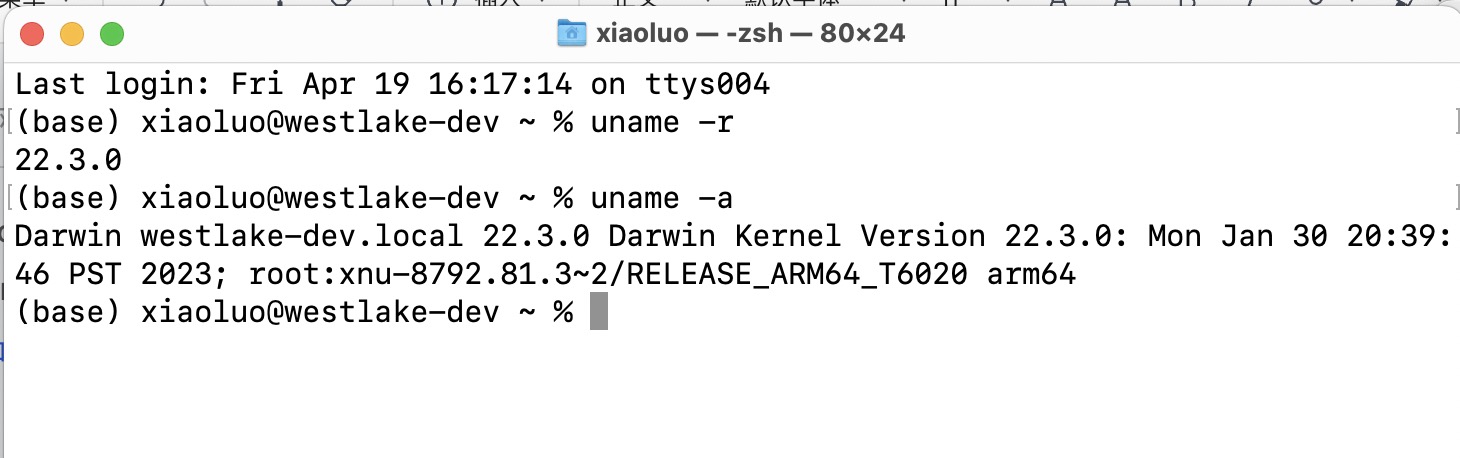
Darwin westlake-dev.local 22.3.0 Darwin Kernel Version 22.3.0: Mon Jan 30 20:39:46 PST 2023; root:xnu-8792.81.3~2/RELEASE_ARM64_T6020 arm64
可以看到内核是darwin kernel version 22.3.0
然后在macos上启动一个ubuntu镜像的容器,同样执行uname -a
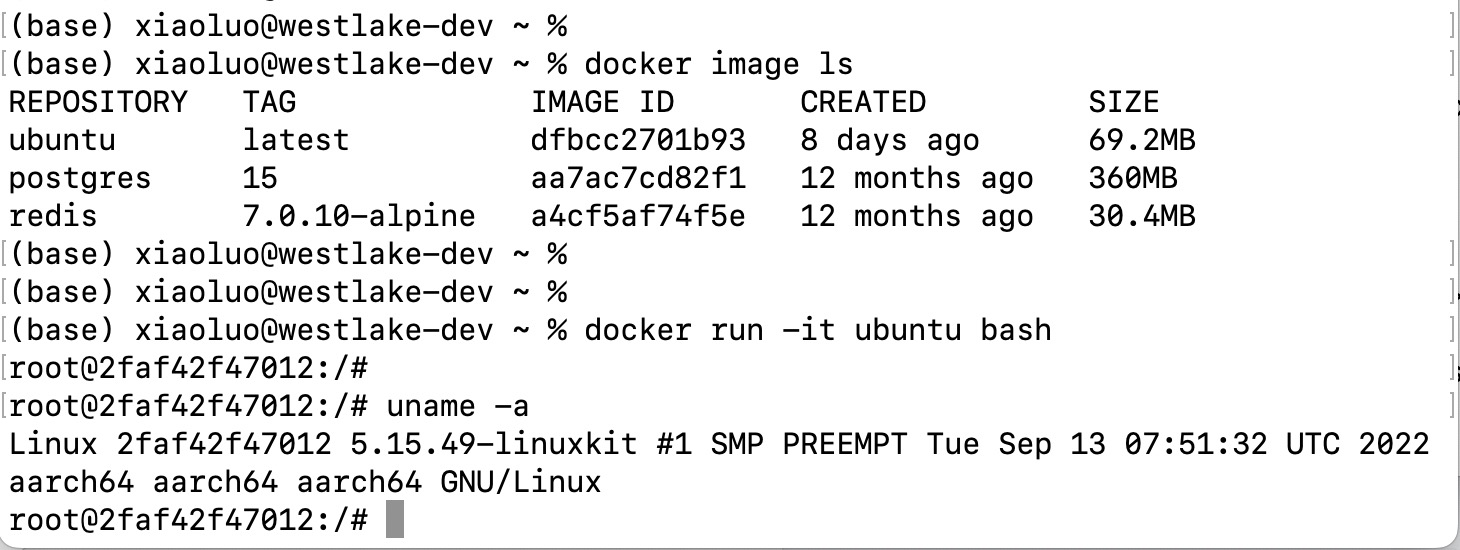
Linux 2faf42f47012 5.15.49-linuxkit #1 SMP PREEMPT Tue Sep 13 07:51:32 UTC 2022 aarch64 aarch64 aarch64 GNU/Linux
可以看到内核是5.15.49-linuxkit,和macos宿主机的内核是不一样的。
构建自己的docker开发环境
1. 先构建一个基础的镜像
Dockerfile如下:只需要先安装基础的vim软件,用于后面编译sources.list文件
FROM ubuntu:22.04
MAINTAINER taijiyutou@outlook.com
RUN apt update && apt install -y vim
其实使用下面的Dockerfile可以更快更简单:(原因是如果没有替换源,apt update操作会比较耗时)
FROM ubuntu:22.04
MAINTAINER taijiyutou@outlook.com
RUN sed -i 's#http://ports.ubuntu.com/#http://mirrors.tuna.tsinghua.edu.cn/#' /etc/apt/sources.list
RUN apt update && apt install -y vim
使用如下命令构建基础镜像
docker build -f Dockerfile_sed -t taijiyutou/ubuntu-dev:sed .
2. 安装开发所需的各种工具
先通过命令启动容器:
docker run -it --name ubuntu taijiyutou/ubuntu-dev:1.0
然后apt install常用的工具,比如git,wget等。
参考:
https://zhuanlan.zhihu.com/p/59548929
https://blog.csdn.net/wu_weijie/article/details/130142115
https://zhuanlan.zhihu.com/p/598857157
3. 安装clang+llvm(可选)
由于我想构建的是一个C++的开发环境,因此需要安装clang和llvm。有多种安装clang+llvm的方法,我们使用的是包管理器的安装方法,可以避免选择系统和CPU架构。使用包管理器也遇到了一些Signature问题,参考下面的笔记解决。
注意:安装clang的时候最好使用
apt-get install clang

#不要带版本
apt-get install clang-14
如果是带版本装的,执行clang -v会提示command not found,需要执行clang-14 -v才行,用起来不方便。
我一开始是使用了带版本的方式安装的,如下:
root@bcb45ddae18e:~# apt install clang-14
Reading package lists... Done
Building dependency tree... Done
Reading state information... Done
The following additional packages will be installed:
  binfmt-support binutils binutils-aarch64-linux-gnu binutils-common fontconfig-config fonts-dejavu-core gcc-11-base gcc-9-base icu-devtools libasan5 libatomic1 libbinutils libc-dev-bin libc-devtools libc6 libc6-dev libclang-common-14-dev libclang-cpp14
  libclang1-14 libcrypt-dev libctf-nobfd0 libctf0 libcurl4 libdeflate0 libffi-dev libffi7 libfontconfig1 libfreetype6 libgc1 libgcc-9-dev libgd3 libgomp1 libicu-dev libicu70 libitm1 libjbig0 libjpeg-turbo8 libjpeg8 libllvm14 liblsan0 libncurses-dev libnsl-dev
  libobjc-9-dev libobjc4 libpfm4 libpipeline1 libpng16-16 libpython3-stdlib libstdc++-9-dev libtiff5 libtinfo-dev libtirpc-dev libtsan0 libubsan1 libwebp7 libxml2 libxml2-dev libxpm4 libyaml-0-2 libz3-4 libz3-dev linux-libc-dev llvm-14 llvm-14-dev
  llvm-14-linker-tools llvm-14-runtime llvm-14-tools manpages manpages-dev python3 python3-minimal python3-pkg-resources python3-pygments python3-yaml python3.10 python3.10-minimal rpcsvc-proto ucf
Suggested packages:
  binutils-doc clang-14-doc wasi-libc glibc-doc locales libgd-tools icu-doc ncurses-doc libstdc++-9-doc pkg-config llvm-14-doc man-browser python3-doc python3-tk python3-venv python3-setuptools python-pygments-doc ttf-bitstream-vera python3.10-venv
  python3.10-doc
Recommended packages:
  libnss-nis libnss-nisplus libclang-rt-14-dev
The following NEW packages will be installed:
  binfmt-support binutils binutils-aarch64-linux-gnu binutils-common clang-14 fontconfig-config fonts-dejavu-core gcc-11-base gcc-9-base icu-devtools libasan5 libatomic1 libbinutils libc-dev-bin libc-devtools libc6-dev libclang-common-14-dev libclang-cpp14
  libclang1-14 libcrypt-dev libctf-nobfd0 libctf0 libcurl4 libdeflate0 libffi-dev libffi7 libfontconfig1 libfreetype6 libgc1 libgcc-9-dev libgd3 libgomp1 libicu-dev libicu70 libitm1 libjbig0 libjpeg-turbo8 libjpeg8 libllvm14 liblsan0 libncurses-dev libnsl-dev
  libobjc-9-dev libobjc4 libpfm4 libpipeline1 libpng16-16 libpython3-stdlib libstdc++-9-dev libtiff5 libtinfo-dev libtirpc-dev libtsan0 libubsan1 libwebp7 libxml2 libxml2-dev libxpm4 libyaml-0-2 libz3-4 libz3-dev linux-libc-dev llvm-14 llvm-14-dev
  llvm-14-linker-tools llvm-14-runtime llvm-14-tools manpages manpages-dev python3 python3-minimal python3-pkg-resources python3-pygments python3-yaml python3.10 python3.10-minimal rpcsvc-proto ucf
The following packages will be upgraded:
  libc6
1 upgraded, 78 newly installed, 0 to remove and 2 not upgraded.
Need to get 141 MB of archives.
After this operation, 757 MB of additional disk space will be used.
Do you want to continue? [Y/n] y

#######剩下的内容省略掉了######
如果不小心带了版本,问题也不大,只需要不带版本再安装一次就可以了。(会省去下载过程,应该只是最后生成了一个软链接)
root@bcb45ddae18e:~# apt install clang
Reading package lists... Done
Building dependency tree... Done
Reading state information... Done
The following NEW packages will be installed:
  clang
0 upgraded, 1 newly installed, 0 to remove and 2 not upgraded.
Need to get 3558 B of archives.
After this operation, 25.6 kB of additional disk space will be used.
Get:1 http://mirrors.tuna.tsinghua.edu.cn/ubuntu-ports jammy/universe arm64 clang arm64 1:14.0-55~exp2 [3558 B]
Fetched 3558 B in 0s (12.4 kB/s)
perl: warning: Setting locale failed.
perl: warning: Please check that your locale settings:
        LANGUAGE = (unset),
        LC_ALL = (unset),
        LANG = "en_US.UTF-8"
    are supported and installed on your system.
perl: warning: Falling back to the standard locale ("C").
debconf: delaying package configuration, since apt-utils is not installed
Selecting previously unselected package clang.
(Reading database ... 21007 files and directories currently installed.)
Preparing to unpack .../clang_1%3a14.0-55~exp2_arm64.deb ...
Unpacking clang (1:14.0-55~exp2) ...
Setting up clang (1:14.0-55~exp2) ...
root@bcb45ddae18e:~# clang
clang: error: no input files
root@bcb45ddae18e:~#
root@bcb45ddae18e:~#
root@bcb45ddae18e:~# clang --version
Ubuntu clang version 14.0.6
Target: aarch64-unknown-linux-gnu
Thread model: posix
InstalledDir: /usr/bin
root@bcb45ddae18e:~#
验证下是不是只是简单生成了一个软链接:
root@bcb45ddae18e:~# ll -h /usr/bin/clang
lrwxrwxrwx 1 root root 24 Apr  1  2022 /usr/bin/clang -> ../lib/llvm-14/bin/clang*
(可选)再安装下llvm,在安装clang的过程中已经安装了很多llvm相关的工具了。下面是llvm的安装过程:
root@bcb45ddae18e:~# lli
bash: lli: command not found
root@bcb45ddae18e:~# lli-14 --version
Ubuntu LLVM version 14.0.6
  Optimized build.
  Default target: aarch64-unknown-linux-gnu
  Host CPU: (unknown)
root@bcb45ddae18e:~#
root@bcb45ddae18e:~#
root@bcb45ddae18e:~# apt-get install llvm
Reading package lists... Done
Building dependency tree... Done
Reading state information... Done
The following additional packages will be installed:
  llvm-runtime
The following NEW packages will be installed:
  llvm llvm-runtime
0 upgraded, 2 newly installed, 0 to remove and 2 not upgraded.
Need to get 6962 B of archives.
After this operation, 112 kB of additional disk space will be used.
Do you want to continue? [Y/n] y
Get:1 http://mirrors.tuna.tsinghua.edu.cn/ubuntu-ports jammy/universe arm64 llvm-runtime arm64 1:14.0-55~exp2 [3204 B]
Get:2 http://mirrors.tuna.tsinghua.edu.cn/ubuntu-ports jammy/universe arm64 llvm arm64 1:14.0-55~exp2 [3758 B]
Fetched 6962 B in 0s (23.2 kB/s)
perl: warning: Setting locale failed.
perl: warning: Please check that your locale settings:
        LANGUAGE = (unset),
        LC_ALL = (unset),
        LANG = "en_US.UTF-8"
    are supported and installed on your system.
perl: warning: Falling back to the standard locale ("C").
debconf: delaying package configuration, since apt-utils is not installed
Selecting previously unselected package llvm-runtime:arm64.
(Reading database ... 21015 files and directories currently installed.)
Preparing to unpack .../llvm-runtime_1%3a14.0-55~exp2_arm64.deb ...
Unpacking llvm-runtime:arm64 (1:14.0-55~exp2) ...
Selecting previously unselected package llvm.
Preparing to unpack .../llvm_1%3a14.0-55~exp2_arm64.deb ...
Unpacking llvm (1:14.0-55~exp2) ...
Setting up llvm-runtime:arm64 (1:14.0-55~exp2) ...
Setting up llvm (1:14.0-55~exp2) ...
root@bcb45ddae18e:~# lli-14 --version
Ubuntu LLVM version 14.0.6
  Optimized build.
  Default target: aarch64-unknown-linux-gnu
  Host CPU: (unknown)
root@bcb45ddae18e:~# lli --version
Ubuntu LLVM version 14.0.6
  Optimized build.
  Default target: aarch64-unknown-linux-gnu
  Host CPU: (unknown)
root@bcb45ddae18e:~# which lli
/usr/bin/lli
root@bcb45ddae18e:~# ll -h /usr/bin/lli
lrwxrwxrwx 1 root root 22 Apr  1  2022 /usr/bin/lli -> ../lib/llvm-14/bin/lli*
root@bcb45ddae18e:~#
安装完clang和llvm之后,可以把到目前为止的改动提交成一个新镜像
docker commit [OPTIONS] [当前容器ID] [新的镜像名称:新的镜像标签]

[OPTIONS]说明:

[-a]:提交的镜像作者。

[-m]:提交时的说明文字。

[-p]:在commit时,将容器暂停。

docker commit -a "name" -m "新增了openssh" ab7da476849b sophgo/tpuc_dev:1.0
参考:
https://zhuanlan.zhihu.com/p/102028114
https://linuxstory.org/how-to-install-clang-on-ubuntu-linux/
https://buaa-se-compiling.github.io/miniSysY-tutorial/pre/llvm_download.html(北航的编译课实验, 可以看下对llvm的介绍)
遇到的问题
Docker desktop will exit(0) docker container immediately after running
一开始以为是docker init cmd的问题,参考:
但是当docker inspect 查看过之后发现应该不是init cmd的问题,因为init cmd是/bin/bash,执行完不会立即退出才对。
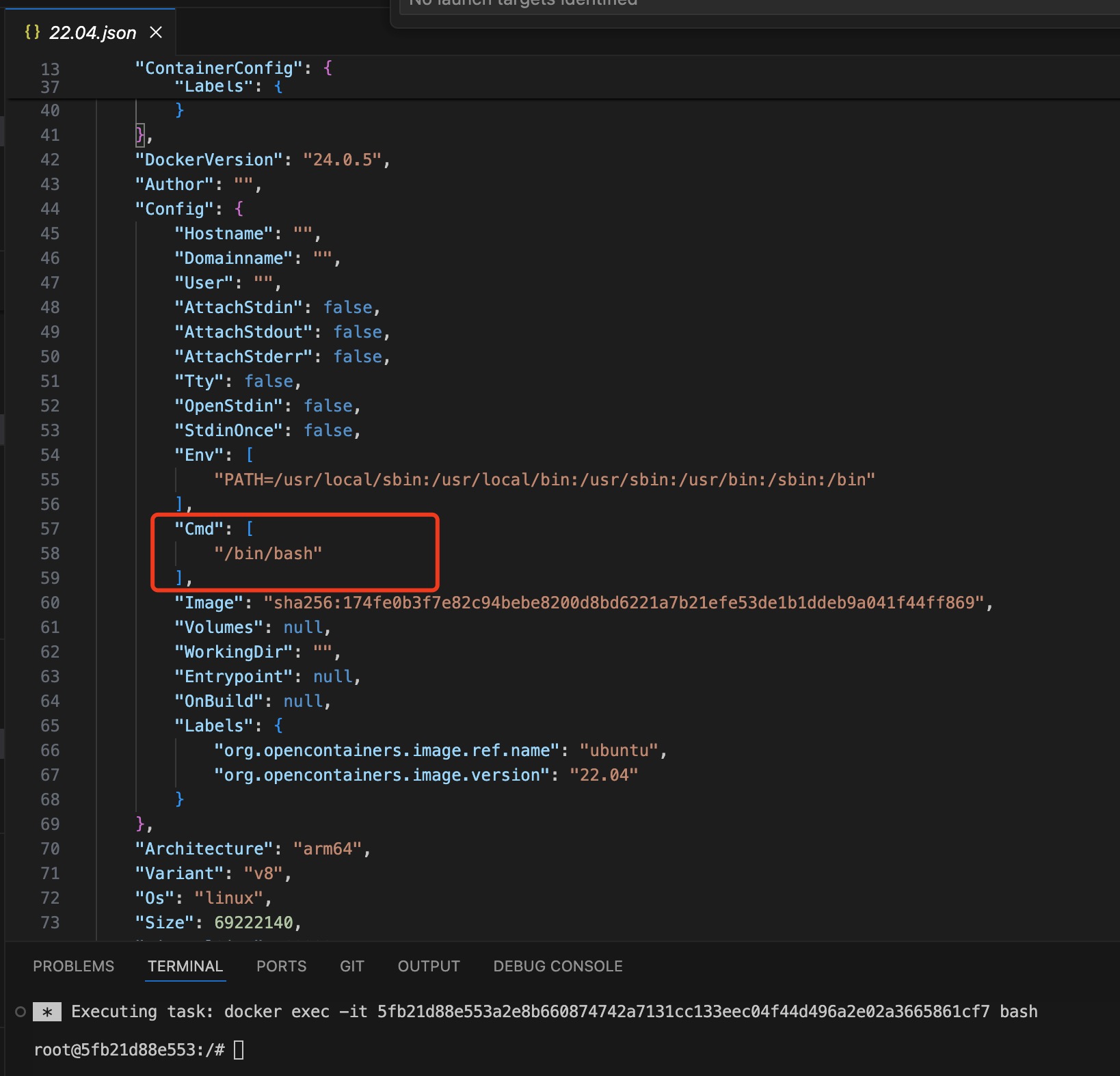
后来发现是docker desktop的问题,参考:
https://github.com/docker/for-win/issues/13242
E: Unable to locate package vim
新装的系统在安装软件包的时候,最好先执行下apt update,不然可能会报找不到软件包的错误。
apt update 是一个命令,用于更新本地系统中可用软件包的列表信息。具体来说,执行 apt update 命令将会执行以下操作:
1. 从系统配置的软件源中下载最新的软件包列表信息。
2. 更新本地软件包缓存,以便系统知道可用软件包的最新状态。
3. 检查配置的软件源是否有更新的软件包可用。
4. 显示更新进度和结果,以便用户了解可用的软件包更新情况。
通过运行 apt update 命令,系统会获取最新的软件包信息,包括新发布的软件包、更新的软件包版本以及任何其他系统或软件更新。这样可以确保系统中的软件包列表信息是最新的,有助于在之后安装新软件或更新现有软件时保持系统的稳定性和安全性。
一般来说,在执行软件包安装、升级或卸载操作之前,最好先运行 apt update 命令来更新软件包列表信息,以确保系统拥有最新的软件包信息,并避免由于过时的软件包列表信息导致的错误或问题。